15 interactive newsletters: Email examples and ideas [2026]
Forget sending more emails. The real win is sending better emails. Interactive newsletters boost click-through rates by up to 300% and help you understand your audience way better than static content ever could.
BY Lydia Burns
April 3rd 2026 – 7 min read
DESIGN
15 interactive newsletters: Email examples and ideas [2026]
Email marketing has been around long enough that readers have developed a reflex for it. They scan, they delete, they move on. The average inbox is ruthless — and static newsletters are losing the fight.
The solution isn't sending more. It's sending better. That means moving from one-way broadcasts to interactive email newsletters that actually give readers something to do.
This guide covers what interactive newsletters are, why they work, and 15 examples and ideas to help you build ones worth opening.
What are interactive email newsletters?
Interactive newsletters are emails that go beyond links and buttons. They include embedded elements — polls, quizzes, animations, calculators, carousels — that invite readers to engage rather than just read.
Most emails include some level of interaction by default. But the most effective ones treat the inbox as an experience, not a delivery mechanism. Instead of pointing readers somewhere else to take action, interactive newsletters let them do it right there.
Why use interactive newsletters?
There’s no denying that interactive newsletters have revolutionized email marketing.
In fact, according to a 2022 Statista survey, 52% of global marketers consider interactive emails the most effective marketing content tool.
Just take a look at some of the benefits these emails bring and you’ll want a piece of this pie as well:
1. Increase click-to-open rates. Compared to traditional, static, and boring newsletters, interactive newsletters intrigue and excite recipients.
That, in turn, gives them a reason to open your emails and makes them want to engage with your email content. Why? Because a poll or quiz inside your email encourages active participation from your users. They might find it fun to answer the questions and will linger longer in the email; they might even click on a link if intrigued enough. Interactive elements in newsletters can increase click throughs dramatically—studies show interactive emails can boost click-through rates (CTR) by up to 200%, and in some cases, up to 300%.
2. Boost engagement. Once a recipient opens your newsletter and notices all those clickable items, curiosity gets the best of them.
Remember Dee Dee from Dexter’s Laboratory? Just as her curiosity for buttons, so do interactive elements in newsletters can similarly spark recipient curiosity and engagement.
Well, the same applies to your interactive content.
3. Increase conversion rates. No matter what action you want your recipients to take, interactive elements will increase the likelihood of that happening. Interactive newsletters allow users to take actions beyond just click throughs—recipients can fill out forms, RSVP to events, or complete surveys directly within the email itself.
For instance, let’s say you want to get customer feedback.
If you send a static email asking your email clients to leave a review, they’ll probably ignore or delete it.
Instead, embed a fun, interactive quiz in your email and they’ll gladly take it.
And you don’t have to believe us; trust the numbers. According to a survey, 82% of people were more likely to respond to an interactive message rather than a static one.
4. Better segmentation of your email list. Using interactive surveys and quizzes you can learn a lot about your recipients. With the right survey tool and some engaging questions, you can easily understand client preferences and boost engagement. Plus, you can later personalize your marketing strategy to deliver even more relevant content.
Then, based on the data you collect, you can better segment your email list and send users more personalized interactive newsletters, especially as platforms like Ceros expand their personalization capabilities.
Why is this important?
Because according to a 2021 McKinsey report, adding personalization to your marketing campaign can increase your revenue by 10 to 15%.
It almost sounds too good to be true, right?
After today’s lesson, you too will be able to reap these interactive content benefits and understand the broader benefits of interactive marketing for your brand.
Setting clear objectives for your interactive newsletter
Before you dive into designing your next interactive newsletter, you need to get clear on what you want it to accomplish. Think of this as your roadmap: What do you want to achieve with your newsletter? Are you aiming to boost sales, increase click-through rates, or simply encourage more engagement from your audience?
Defining your purpose and identifying your target audience will help you focus your efforts and create content that truly resonates. For example, if your goal is to drive more sales, you might want to include interactive elements like embedded videos showcasing your products, or a quiz that helps readers find the perfect solution for their needs. If you’re looking to increase engagement, consider adding surveys or polls that invite feedback and spark conversation.
A well-planned digital marketing strategy that leverages interactive emails is a fantastic way to stand out in crowded inboxes. By aligning your newsletter design with your objectives, you’ll create a more meaningful connection with your audience—and see better results from every send, especially if you understand what interactive content is and how to get your company to adopt it.
10 examples of interactive newsletter elements
Not all interactive elements are created equal. Some are built for engagement, some for conversion, some for feedback—and knowing which to reach for makes the difference between a newsletter that gets clicked and one that gets ignored.
Whether you're looking to boost click-through rates, collect customer feedback, or drive more sales directly from the inbox, the right interactive features can get you there. To choose the best creation platforms, you can look at the 10 best interactive content tools. Here are examples of 10 of the most effective types of interactive newsletter elements, and when to use each one.
1. Interactive infographics
Complex data doesn't have to be a wall of text. Interactive infographics let you present figures, comparisons, and processes in a way readers can actually absorb. Research consistently shows that visual content improves both attention and retention — and when that content is interactive, engagement goes up further.
Use them when you have dense information to convey and want to make it feel approachable.
Here's an example:
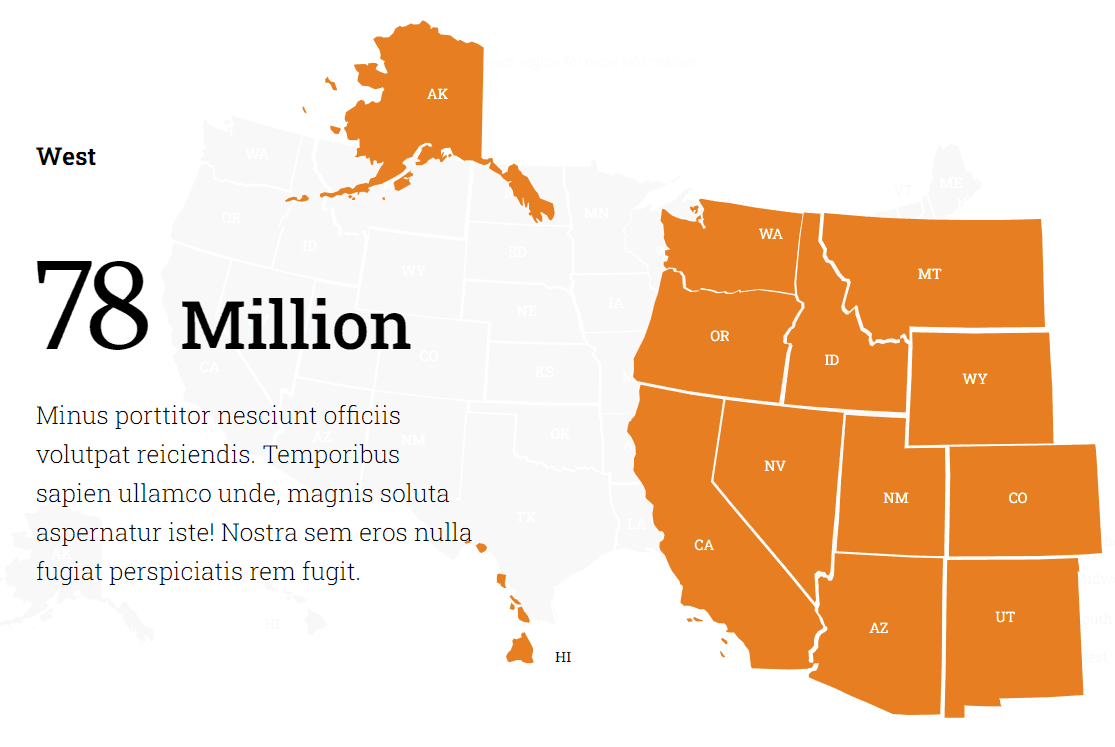
Image source: Ceros
2. Quizzes
Quizzes are one of the most versatile interactive formats. They work for product recommendations, audience research, brand awareness, and lead qualification. A well-crafted quiz feels like a conversation — it tells the reader something useful about themselves while giving you signal about who they are.
Here's a cool Ceros quiz example that helps the recipient identify the service that best fits their needs.
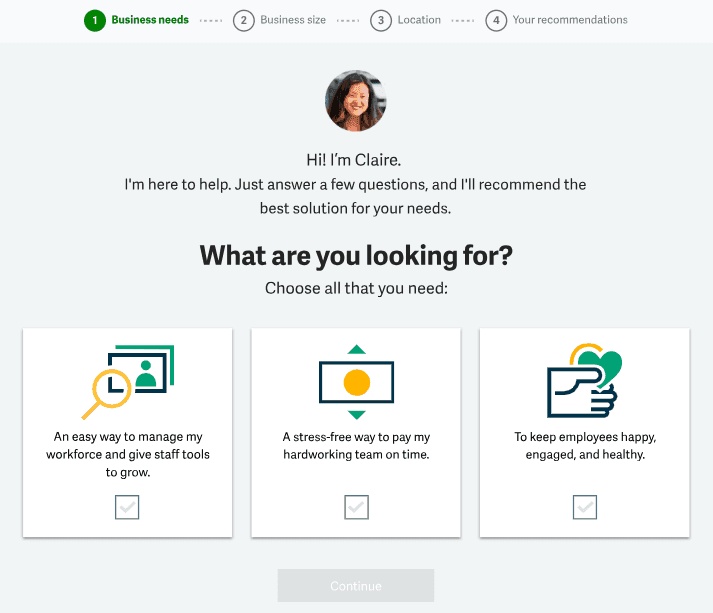
Image source: Ceros
3. Image carousels
Image carousels are interactive elements that present multiple pieces of content or visuals in a rotating sequence.
They are perfect for showcasing new products or promotions because they are visually appealing and are ideal for highlighting key features, which makes the message easier to understand. Carousels do the heavy lifting in terms of design work, but the payoff is a dynamic, visually appealing experience that stands out in the inbox.
Animated GIFs, image carousels, and interactive tables of contents can all create a dynamic, visually appealing experience in emails.
And as a result, they’ll likely drive conversion rates and boost sales.
So, forget about static images, and opt for an image carousel instead. Due to their dynamic nature, the carousel is highly engaging and effective in catching someone’s attention, significantly improving user experience.
But how do you create an image carousel?
Well, the easiest way is to use Ceros. Check out this tutorial and see how easy it is:
4. Surveys
Surveys are probably the most powerful tool for getting valuable customer feedback because, by asking targeted questions about their preferences, you can receive valuable insight into what your customers truly want.
And feedback can help you improve and personalize customer experience to drive conversions and sales.
You can integrate a multiple-choice survey or an open-ended survey in your newsletter design depending on the type of data you're looking for.

Image source: Ceros
Plus, if you want to be sure that your customers will take the survey, you can offer them an incentive in the form of a discount code.
5. Videos & GIFs
Videos and GIFs can make your newsletters dynamic and allow you to attract subscribers' attention and pique their interest. For instance, Igloo Software dramatically increased their click-through rate by creating videos about their workplace culture, which they shared in an email.
Plus, the good thing about interactive elements is that you can pack them with loads of valuable info that would otherwise be impossible to fit into one email.
For example, videos. In a short time frame, you can showcase how to use the super cool watch you've created without relying on complex text to get the message across. It's relatable and people will pay attention more than some complicated written instructions.
But we hear you, video integrations are not always easy to include in your email designs. Some email providers don't even support embedded videos and when they do, users can't see the video properly.
Plus, you have to think of file size; the larger it is, the longer the loading time, which defeats the purpose of having interactive elements in your email.
If it's too much trouble, use a GIF instead and include a link to your videos.
6. Countdown timers
Countdown timers create a sense of urgency that makes people rush to buy what you're selling. Ever heard of FOMO? Well, it's a widely-used marketing strategy that plays on the psychological principle of scarcity.
Whether it's a limited-time offer, discount, or giveaway, people will look at the countdown timer and think, “Oh, I have to buy this NOW before I lose the chance!” By reminding them that time is running out on this limited offer, you will engage your subscribers and keep them hooked.
Tip: create a sense of urgency right from the subject line to make sure the recipient opens your email to see the countdown timer. Things like “Limited offer on shoes” can make the recipient curious enough to check out your offer.
7. Interactive calculators
Calculators in newsletters allow recipients to input their own numbers and get an estimate of a service cost. Simple!
Just because we're talking about a practical tool, doesn't mean you shouldn't care how it looks.
And don't worry if you have no idea how to make them look eye-catching.
You can use a Ceros calculator template, and personalize it with colors and fonts that would catch any user's eye and make them want to engage with it and even share it with others.
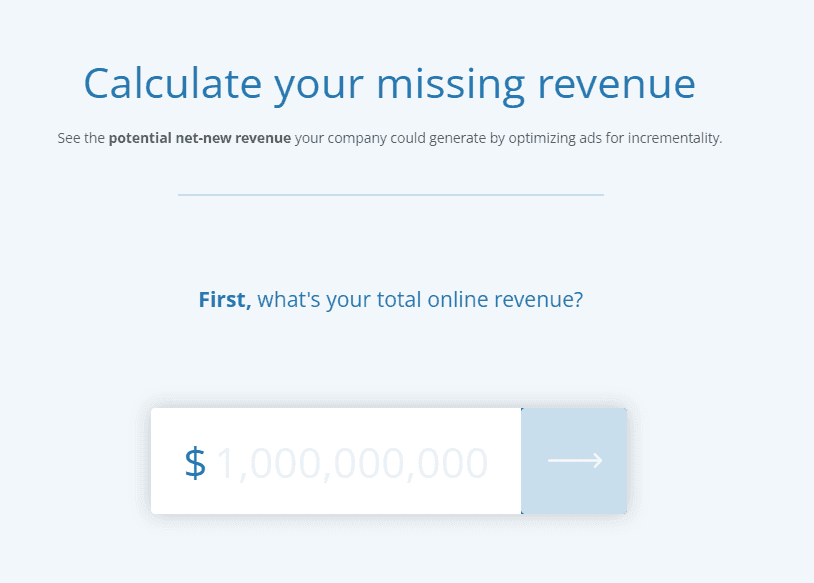
Image source: Ceros
8. Accordions
Accordions are interactive elements that include vertically stacked headers. Once the recipient clicks on a header, it reveals additional info.
These elements work well in a newsletter because they help you organize your content in a visually appealing way.
Plus, users can simply click on the headers they're interested in and find the information they're looking for, without feeling overwhelmed by text-heavy graphics.
That's what Ceros aimed to do with their own accordion template, which you can personalize and use at your convenience.
Here's an example:
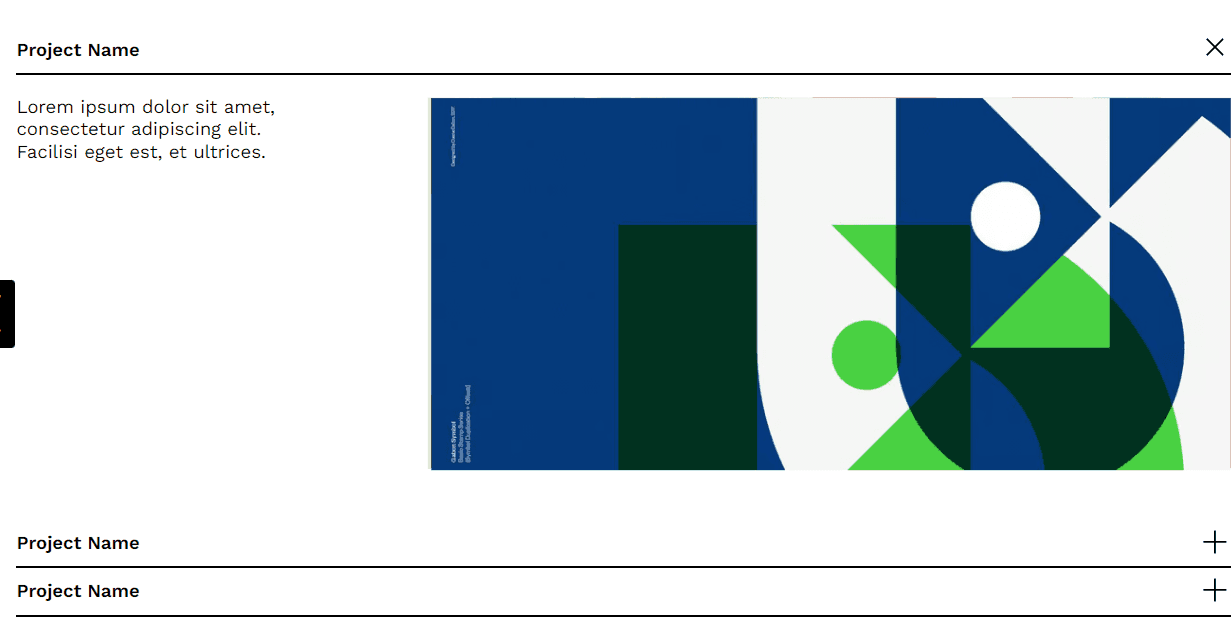
Image source: Ceros
9. Interactive invitations
Do you want to make sure people will attend your event?
Give interactive invitations a try.
Besides offering information on the date, time, and location of an event, these invitations allow recipients to RSVP with the click of a button. And yes, you can see the total number of attendees through dynamic updates.
This way, those who didn't sign up yet will see it and might wonder if it's worth attending (the correct answer is yes!).
On top of that, interactive invitations can be used to remind people to attend the event.
For example, Gmail users could have their Google calendar updated with upcoming events they're attending without having to manually add an event.
This convenience saves people time and effort as the only thing they need to do is click Accept. So, it creates a memorable experience as well as ensuring participants won't forget about the event.
10. eCommerce product previews
Today people are always in a rush. 🏃
Our advice to you, dear eCommerce brand owners, is to look for ways to reduce the time it takes for users to find a product they like and ultimately buy it.
Of course! How can I do that?
By including a shopping widget with new product previews in your newsletter, users can pick the size and color, and add the product to their cart without even needing to access your website.
Once that's done, they click on the buy button you've added to your newsletter for them and they're redirected to the checkout page.
That easy!
***
There you have it, 10 interactive elements that will help you revamp your email marketing campaign.
Now, want to see some real-life examples?
5 inspirational interactive newsletter ideas
While you can mix and match the previous 10 interactive elements however you want, we’ve prepared five inspiring interactive newsletter examples to spark your creativity. When designing your own interactive newsletters, take a creative approach—experiment with innovative features like emojis, gamification, and engaging content to boost audience engagement and stand out from the competition.
Newsletter idea #1: Bellroy
Check out Bellroy's work bag quiz.
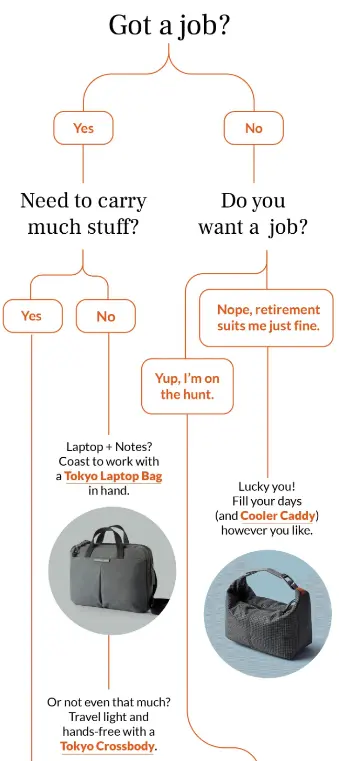
Image source: Really Good Emails
This quiz has it all. It's visually appealing, fun, and informative.
The recipient can easily discover what type of bag best suits their needs, while also seeing Bellroy's top product recommendations.
So, by the end of the quiz, the user will know exactly what to buy (and is more likely to buy it).
In addition, some of the answers are really funny, so this newsletter will put the subscriber in a good mood. Why? Because people will create a positive association with your brand, thinking, “This brand made me laugh, they are really cool!”
Newsletter idea #2: MailChimp
Here's a survey from MailChimp that creates a sense of urgency.
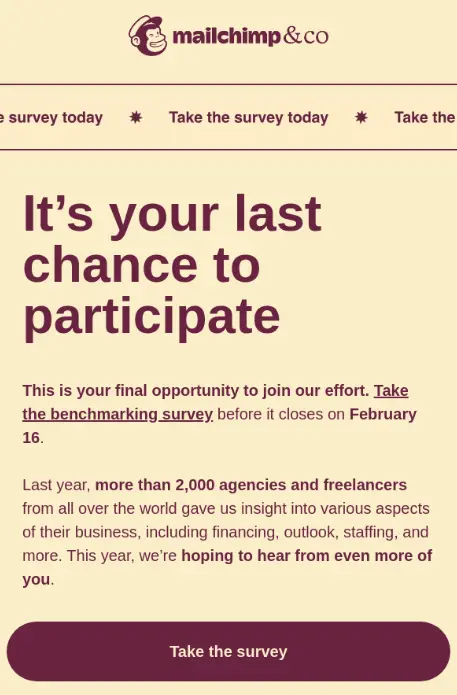
Image source: Really Good Emails
While this newsletter doesn't include a countdown timer per se, the wording and structure make you feel it includes one.
The main heading “It's your last chance to participate” gets you hooked and makes it more likely that you'll take the survey at the end.
Even the subject line is very telling: ‘🚨 Last call to take the benchmarking survey.'
Newsletter idea #3: Grammarly
Take a look at some of Grammarly's infographics.
Talk about a newsletter packed with complex information, yet so easy to understand. Right?
Through the clever use of visuals, Grammarly manages to segment the info perfectly, so the reader can quickly get the key points. The minimal use of text and the emphasis on visuals help users retain the content better and make them curious for more.
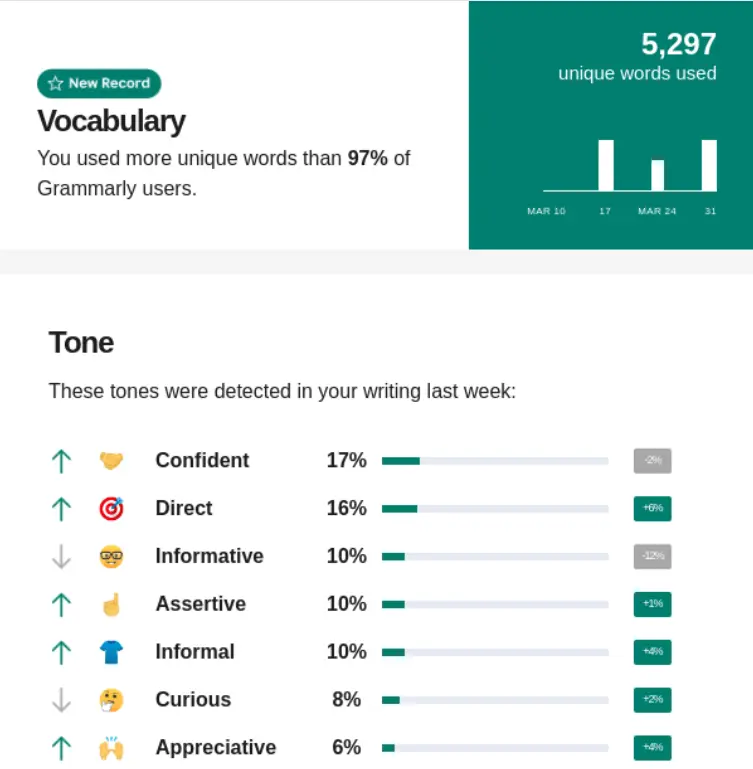
Image source: Really Good Emails
Instead of sending their clients a lengthy email containing text that nobody would read, Grammarly uses infographics to present complex information in an easy-to-use format.
And we love that they also added emojis to make the content even more relatable. 😍
Newsletter idea #4: TurboTax
Here's a great alternative to embedding videos in your newsletters.
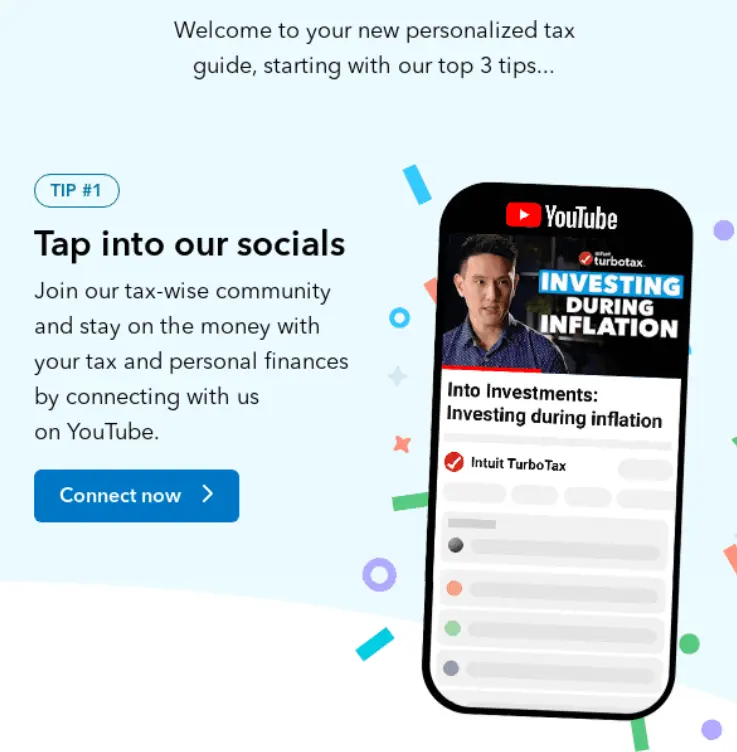
Image source: Really Good Emails
Since integrating video content into emails is a bit tricky due to file size or security issues, TurboTax includes an image preview of a video in the newsletter to spark the recipient's curiosity.
Also, give a few details about the video, just like TurboTax, so that the subscriber knows what to expect and add a visible CTA linked to the video.
Newsletter idea #5: BBC
Last but not least, check out this cool BBC accordion.
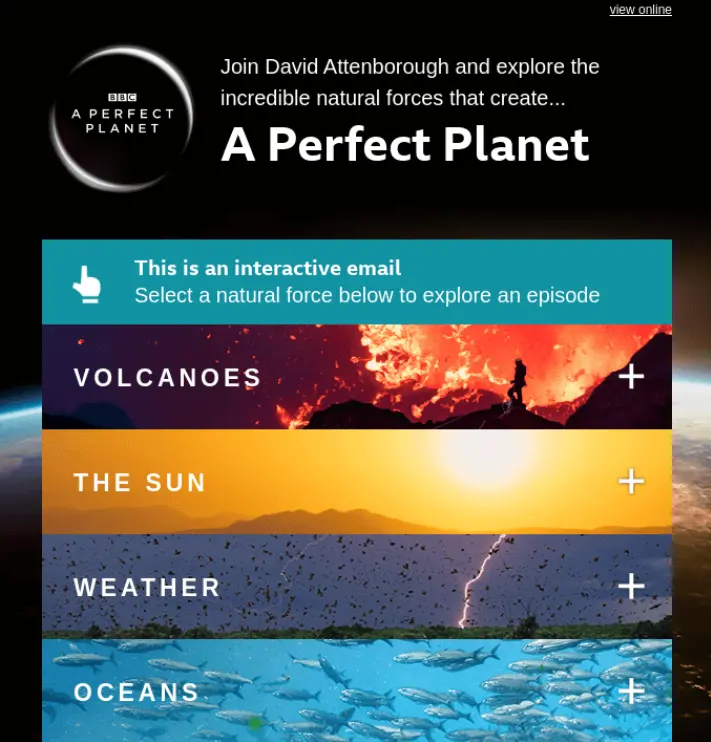
Image source: Really Good Emails
There's no doubt that the BBC has lots of educational content to convey to its subscribers. Using an accordion to not overwhelm users with information is a great choice here. By organizing your content, you improve readability, as well as give users control over what they want to read.
The subscriber sees only a beautiful email design with eye-catching visuals and a few headers listing the natural forces.
If they want to learn more about one of the natural forces, they can simply tap the header and get the details.
***
With all that in mind, let's explore some of the best practices you should use.
Segmenting your audience for better engagement
One-size-fits-all newsletters are a thing of the past. To truly connect with your readers and maximize engagement, segmenting your audience is key. By dividing your subscribers into groups based on their interests, behaviors, or preferences, you can deliver content that feels tailor-made for each segment.
Interactive tools like multiple choice surveys, quizzes, and feedback forms are invaluable here. For example, you might include a quick survey in your newsletter asking readers about their favorite topics or products. The data you collect can then be used to create targeted content that speaks directly to each group’s needs and interests.
This personalized approach not only increases engagement but also boosts click-through rates and drives more sales. When your audience feels understood, they’re far more likely to interact with your content, click your links, and become loyal customers. So, don’t just create—segment, personalize, and watch your results soar.
Building excitement with interactive elements
Want to make your newsletter irresistible? Build excitement with interactive elements that grab attention and encourage engagement from the moment your email lands in the inbox.
Countdown timers are a great way to create urgency around a limited-time offer or upcoming event, while exclusive promotions and discount codes can reward your most engaged readers. Quizzes, games, and contests add a fun, interactive twist that keeps your audience coming back for more. For example, you could create a quiz that tests readers’ knowledge of your brand, with a special code or prize for top scorers.
By weaving these interactive elements into your newsletter design, you not only make your emails more engaging but also build anticipation and drive action. The result? Readers who are excited to open, click, and share your content—helping your brand stand out and your promotions succeed.
Creating a community through your newsletter
An interactive newsletter isn’t just a tool for sharing updates—it’s a powerful way to create a sense of community among your readers and subscribers. By fostering interaction and connection, you can turn your newsletter into a hub where your audience feels valued and involved.
Incorporate interactive features like discussion forums, live chats, or links to private social media groups where readers can connect and share their experiences. For example, you might invite subscribers to join a members-only Facebook group, where you host live Q&A sessions or share exclusive promotions and user-generated content, or tap into an existing interactive content community around your brand.
Encouraging your readers to participate and engage with each other transforms your newsletter from a one-way communication channel into a vibrant, interactive community. This not only boosts engagement but also builds loyalty and keeps your subscribers looking forward to every issue.
Measuring success: tracking interactive newsletter performance
Creating an engaging interactive newsletter is only half the battle—the other half is measuring its success. To ensure your efforts are paying off, it’s important to track key performance indicators like click-through rates, click-to-open rates, and conversion rates.
Leverage analytics tools to monitor how your audience interacts with different elements, such as images, quizzes, and calls-to-action. For example, you can use A/B testing to compare which interactive elements drive the most engagement, or analyze data to see which sections get the most clicks.
By regularly reviewing your newsletter’s performance, you can make data-driven decisions to refine your content and strategy. This ongoing optimization helps you create more engaging, effective newsletters that truly resonate with your audience—and deliver the results you’re aiming for.
Interactive newsletter best practices
You’ve been such a good student so far, so we’ll give you some additional tips on how to create interactive email newsletters that will wow your subscribers.
First, always keep your design simple and easily scannable—this enhances readability and engagement for your audience.
When choosing tools or services to add interactive features like quizzes, forms, or games, look for platforms that make it easy to test your interactive newsletters on multiple devices and browsers to ensure responsiveness. Many services—including modern AI web design tools and platforms—are available to help you seamlessly integrate these interactive elements into your campaigns.
Consider using newsletter templates designed for company-wide internal communication, such as monthly updates for employees. You can also align interactive quizzes with your business objectives, like evaluating business size or engaging customers in a professional context to boost brand visibility and interaction.
1. Vary the type of interactive content
Diversity is your best email marketing ally.
While you can include multiple interactive elements in one newsletter, it's best to stick to one or two so you don't overwhelm your recipient.
Instead, you should vary the type of interactive content from one newsletter to the next to keep your audience guessing. For instance, you can include a simple poll in your newsletter one week. And the next you can share a video tutorial on how to use your product effectively.
And even if you have a favorite, you should always experiment with new interactive elements so that your subscribers don't get bored.
2. Keep interactive elements relevant to your audience
Before you create a newsletter, think about your target audience's preferences and needs.
Then, choose interactive elements relevant to them.
For example, if you're sending your subscribers a promotional email about kitchen renovations, you could include a calculator to estimate how much theirs would cost.
You don't need to overload your email with tons of interactive elements that don't bring any value to the recipient.
3. Balance visuals and informative content
Your newsletters should always include valuable information.
In other words, don't just focus on interactive elements and forget about the text.
Instead, use visuals to break down the noninteractive pieces of text to make it more digestible.
Also, you can keep the static email headers and footers, as they provide useful contact information.
4. Keep everything simple and easily scannable
No matter how interesting and engaging your newsletter is, your subscribers rarely have the time or patience to read the entire thing.
Keep the email design simple and make sure readability is on point.
Use ample white space and don't overload your newsletter with text, visuals, or interactive elements.
That way, the recipient can take a quick look, remember the key points, and read only the sections that interest them.
5. Use the right tools for the job
You've read this whole article and now you have to implement what you read… We know it's a lot of work! 😫
But!
You don't have to do it all on your own, especially when you have powerful tools, like Ceros, to help you.
Ceros offers various interactive templates that you can use to start crafting your interactive newsletters, and browsing Ceros Inspire’s create, share, inspire gallery is a great way to see what’s possible.
And you can even analyze the performance metrics of your interactive newsletters in real time.
So, why would you ever want to work alone?
***
That's enough information for one day.
Now, over to you.
Over to you!
Now that you have all the insights, it’s time to create an interactive newsletter that truly engages your audience. Use the tips above to create an interactive experience—incorporate clickable elements, animations, and engaging content that turns your readers into newsletter people who look forward to every issue.
Ready to get started? Create an interactive newsletter today and see how immersive content can boost engagement and set your brand apart.
Don’t miss out—subscribe to stay updated with the latest interactive newsletter ideas and inspiration.
And if you don’t know where to start, reach out to Ceros.
To learn more about how Ceros works, book a free demo today.